






Save CA$2.99
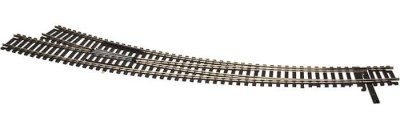
Atlas 588 - HO Scale Code 100 Custom Line(R) Mark IV Turnout -- Curved, Right Hand
SKU: 150-588

- Shipping infoWe deliver worldwide
- Payment methods

- Return PolicyWe accept returns
Atlas 588 - HO Scale Code 100 Custom Line(R) Mark IV Turnout -- Curved, Right Hand
This Atlas Code 100 Customline Curved Turnout features nickel silver rail and black plastic ties that match other Atlas Code 100 trackage. This turnout can be set up as a remote or manual switch depending on which switch machine is added by the modeler. The turnout also features die-cast points and an isolated, die-cast metal frog with a power contact. You can use this power contact option to energize the frog and prevent loss of power when a locomotive is passing through. The outside radius of the turnout is 30" and the inside radius is 22".
To replace this text with your store's actual shipping info, go to "Design -> Menus & Pages -> Product Page Tabs" and edit the Shipping info page.
We accept the following payment methods:
To replace this text with your store's actual info on payment methods, go to "Design -> Menus & Pages -> Product Page Tabs" and edit the Payment methods page.
This page is intended for your policy regarding returns and refunds.
Here you can provide information as to what products can be returned, how many days your customers have to return their purchase, whether they will receive a refund in the original form of payment, a replacement or a store credit, who pays for the shipping of the previously purchased products to the store, and so on.
To replace this text with your store's actual return policy, go to "Design -> Menus & Pages -> Product Page Tabs" and edit the Return Policy page.
Here you can provide information as to what products can be returned, how many days your customers have to return their purchase, whether they will receive a refund in the original form of payment, a replacement or a store credit, who pays for the shipping of the previously purchased products to the store, and so on.
To replace this text with your store's actual return policy, go to "Design -> Menus & Pages -> Product Page Tabs" and edit the Return Policy page.
Customers who viewed this product also bought
- 18% less
Atlas 532 - HO Code 83 Curved Snap Track - 18 Inch Radius (6/pkg)
SKU: 150-532 Only 1 left in stock.- 21% less


